Insurance claims
Roofing insurance claims, tracked on every job.
An insurance job has more moving parts than a retail one: a carrier, a claim, an adjuster, a deductible and checks that arrive in pieces. MetaSync keeps all of it on the job itself, so nobody has to dig through a spreadsheet, a text thread and a folder of photos to find out where a claim stands.
The claim
Every claim lives on its job.
Claim, policy and date of loss in one place
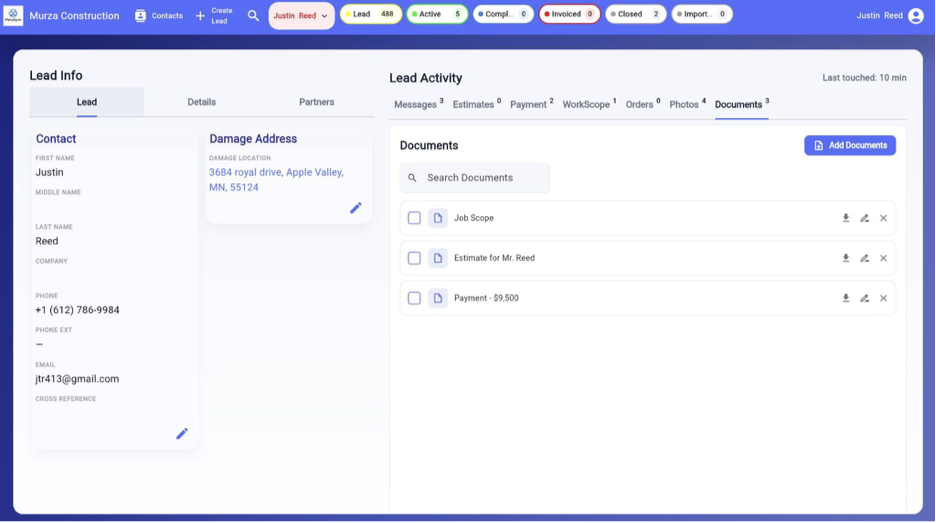
Each job carries the insurance company, the policy number, the claim number and the date of loss, next to the damage address and the homeowner's contact details. The office, the sales rep and the production manager all look at the same record.
Three checkpoints for every claim
Claim filed. Adjuster met. Claim approved. Tick each one as it happens and anyone on the team can see at a glance which jobs are waiting on the homeowner, which are waiting on the adjuster and which are ready to build.
Adjusters you only enter once
Adjusters have their own list with name, company, phone, fax and email. The next time the same adjuster turns up on a job, pick them from the list instead of typing them in again. Insurance companies work the same way.
The claim follows the job to the invoice
When you send the invoice, the claim number and the adjuster's name and phone are printed on it with the job address and the balance due. That is the paperwork homeowners and carriers ask for, without retyping it. See an example roofing invoice.
From storm to final check
How a roof insurance claim moves, and where MetaSync keeps it.
Every carrier and every state has its own rules, but most insurance roofing jobs pass through the same stages. Here is what each one looks like inside MetaSync.
1. Inspection and lead
After a storm the calls come in faster than anyone can write them down. Each one becomes a lead with the homeowner's details and the damage address, assigned to a rep, with a status that says where it stands. Photos from the inspection go straight onto the job, each with the date it was uploaded.
2. Claim filed
The homeowner files with their insurance company. Record the carrier, the policy number, the claim number and the date of loss on the job, and tick claim filed. From here on everyone working the job has the numbers the carrier will ask for.
3. Adjuster meeting
Add the adjuster to the job, with their phone and email one tap away, and tick adjuster met once the inspection is done. Notes from the meeting go into the job's messages, and the people you choose to notify get them by email, so nothing said on the roof gets lost.
4. Claim approved and scope agreed
Once the carrier approves, tick claim approved and set the work scope and contract amount on the job. Keep the carrier's paperwork in the job's documents, where the office can find it without asking.
5. Materials and build
Order materials from the job. MetaSync emails the order to your supplier with the delivery or pickup details and PO number, and when the supplier replies, the answer comes back to whoever sent the order.
6. Collect and close
Insurance money rarely arrives as one payment. Log each check on the job as it comes in, alongside the homeowner's deductible, and MetaSync keeps the balance due up to date until the job is paid and closed.
The money
Know what every insurance job earned.
Every check and every cost on one sheet
Money in and money out are recorded against the job: checks from the carrier, the deductible, materials, labor, dumpsters. MetaSync adds them up into gross and profit for that job, so you are not waiting for the accountant to find out whether a roof made money.
Commission worked out for you
Set a rep's commission as a percentage of profit or of gross, and MetaSync shows the commission and the profit left after it on every job. Record the payout when you make it.
Returned material handled properly
When the crew sends unused shingles back and the supplier refunds them, log it as returned material. It counts toward the job's profit, but it does not reduce what the homeowner still owes, so the balance due and the invoice stay right.
The numbers stay in the office
A crew member can work the job without seeing what it earned or what commission it carries. You decide who sees the money, person by person. More on that on our security page.
Who it is for
Built for insurance restoration contractors.
MetaSync was built by roofers with more than fifteen years in the trade, for storm and insurance restoration companies from a single owner-operator up to a team of ten. Retail and insurance jobs share the same job record, so you run both in one system and simply leave the insurance fields empty on a retail job.
FAQ
Questions about insurance work.
Can I track the claim number and policy number on each job?
Can I keep a list of adjusters?
How does a roof insurance claim work?
How long does a roof insurance claim take?
Does MetaSync handle supplements?
Is it only for insurance work?
Put your next storm season in one place.
Free for 14 days. Nothing is charged until the trial ends.
Start Free Trial