Project management
Roofing project management software that follows every job.
From the first call to the last check, each roofing job in MetaSync has one record: who is working it, where it stands, what was ordered, the photos, the paperwork and every message about it. The office stops chasing the field for updates, and the field stops calling the office for details.
Every job at a glance
See where each roofing job stands.
Statuses, counts and the last time anyone touched it
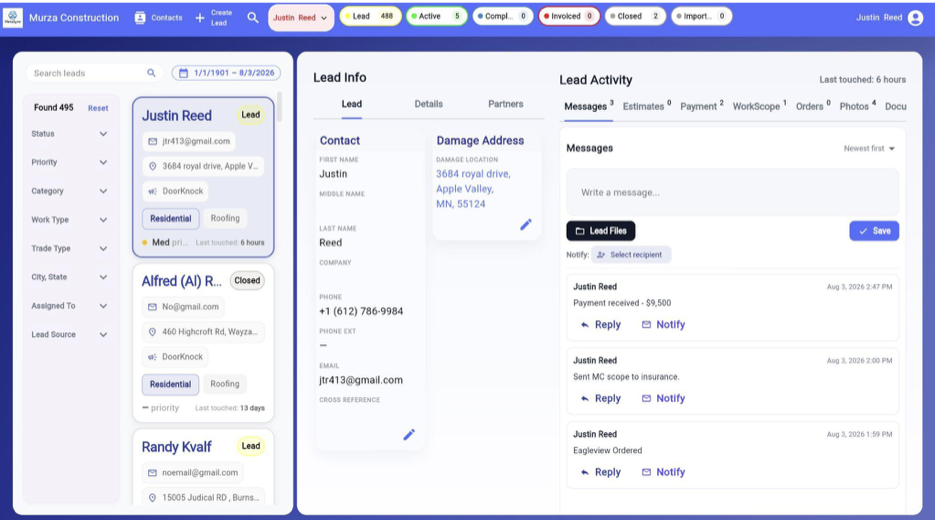
Every job carries a status, and the top of the screen counts how many sit in each one, so you can see the whole pipeline without running a report. Each job in the list shows when it was last touched, which makes the ones going quiet easy to spot.
Find any job in seconds
Search by customer name, job number, company or any part of the address. Narrow the list by status, priority, job category, work type, trade, city or state, who it is assigned to and where the lead came from, and set a date range.
Every job has an owner
Assign each job to a rep. Reps see the jobs assigned to them or that they created; managers see every job, and can switch to one rep's view to see exactly what that person is carrying.
Inside a job
Everything about the job, on the job.
Open a job and its details and its activity sit side by side. Nobody has to know which spreadsheet, text thread or shared folder something went into.
The customer, the property and the people involved
Contact details and the damage address, the job's category, work and trade type, priority and lead source, the contract date and deadline, and the partners on the job: the suppliers and subcontractors working it and, on an insurance job, the adjuster.
Work scope and estimates
Build the work scope line by line, with upgrades, discounts, supplements and work that will not be done, and MetaSync totals the contract. Keep the estimates you send or receive, as PDF, Word or Excel files, on the job next to it.
Photos with the date they were added
Upload a batch of photos at once from the roof or the office. Each one is stamped with the date and time it was uploaded, photos are compressed so they load quickly, and you can download any selection of them in one go.
Documents in one place
Contracts, the insurance paperwork, permits, warranties and invoices from suppliers: PDF, Word, Excel, CSV and text files are kept on the job, with upload dates.
Materials
Order materials without leaving the job.
Orders from your own templates
Save the materials lists you order again and again as templates, then start an order from one and adjust the quantities for the roof in front of you.
Sent to the supplier, with the details they need
MetaSync emails the order to your supplier with the PO number and either the delivery date or a pickup, and the order stays on the job. When the supplier replies, the answer goes to whoever sent the order instead of disappearing into a shared inbox.
Unused material comes back off the books
When leftover material goes back and the supplier refunds it, record it as returned material. The job's profit reflects it, and the homeowner's balance is not touched.
The team
The whole crew on the same page.
Messages that stay with the job
Notes and updates are posted on the job itself, newest first, and you choose who on the team gets them by email. Replies stay in the same thread, so the history of the job reads top to bottom months later.
The numbers stay in the office
Managers decide, person by person, who sees what a job earned and what commission it carries. Crew members get everything they need to do the work without the job's costs.
Know who changed what
When a figure on a contract changes, MetaSync records who changed it and when, so a number that looks wrong can be traced back.
The money
Know what every job made.
Gross, costs, profit and commission per job
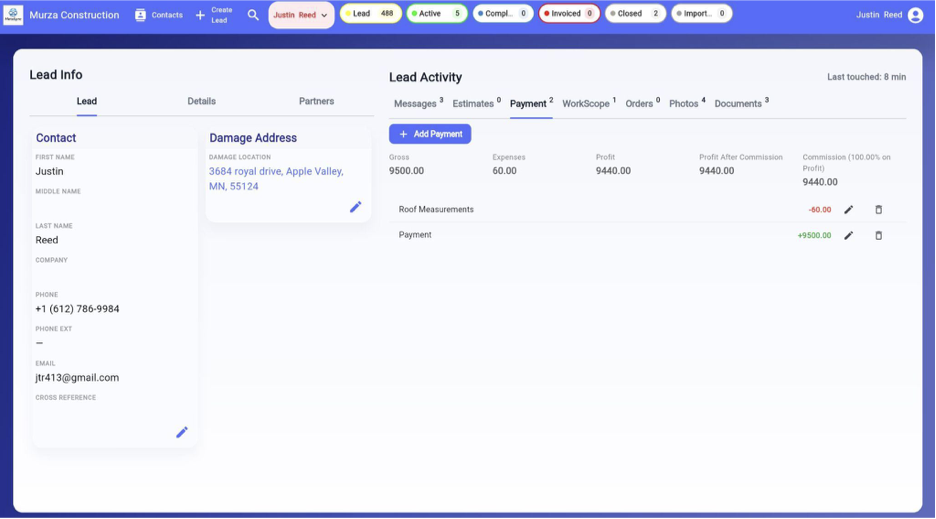
Record what comes in and what goes out on each job, and MetaSync works out gross, expenses, profit and the rep's commission, then builds the customer's invoice from the work scope and the payments received.
Good to know
What MetaSync does not do yet.
We would rather you know before you start a trial.
No crew scheduling calendar
Jobs carry a contract date and a deadline, and orders a delivery date, but there is no calendar for scheduling crews.
No roof measurements or estimating yet
Measurement reports are in development. Until then, keep the reports and estimates you already use on the job as files.
No accounting integration
MetaSync does not connect to QuickBooks or other accounting software today.
FAQ
Questions about managing roofing jobs.
Is MetaSync a CRM or project management software?
Can I order materials from MetaSync?
Can I see what each rep is working on?
Does MetaSync schedule crews?
Can crew members see what a job costs?
Run your next job from one place.
Free for 14 days. Nothing is charged until the trial ends.
Start Free Trial